Chalkedin vs Calendly, Acuity Scheduling and Doodle
Three of the best-known scheduling tools, side by side with one built for the other half of the job: when you are the one asking a client for their time.
The short answer
- Choose Calendly when people come to you and you want them to book themselves into your open times, or your team needs bookings shared out and routed to the right person.
- Choose Acuity Scheduling when you run an appointment business and want clients to book, fill in a form and pay in one go.
- Choose Doodle when you need one time that suits a whole group.
- Choose Chalkedin when you are the one asking. You propose a specific time in an email or text message from your own address or phone, and your client answers in one tap, with nothing to browse, nothing to fill in and no account to make.
Two ways to set a meeting: let them pick, or propose a time
Calendly, Acuity Scheduling and Doodle are built around one idea: put your free times in front of people and let them choose. Calendly and Acuity give you a booking page. Doodle gives you a poll. That works beautifully when the other person wants the meeting: a prospect who asked for a demo, a client booking a haircut, a committee hunting for a date.
It works less well when you are the one who wants it. A sales rep chasing a review meeting, an account manager booking a site visit or a tradie arranging an inspection is asking somebody busy for their time. Sending them a link to browse your calendar hands them a job. Many people just leave it.
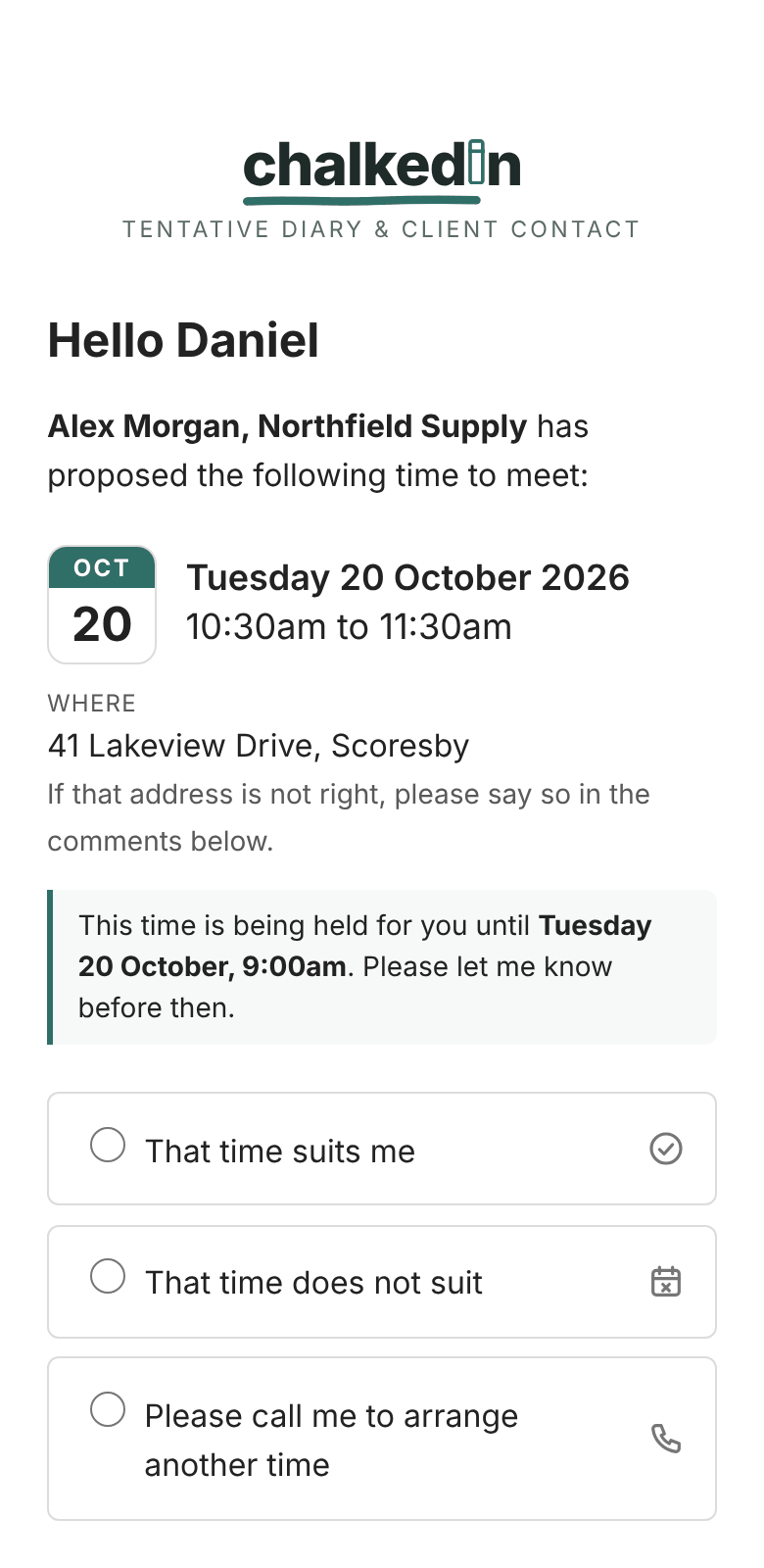
Chalkedin turns it around. You propose one specific time, in the email or text message you were going to send anyway. Your client opens the link and taps That time suits me, That time does not suit or Please call me, or ticks the days that would suit better. The time is held for them, so you can't double-book it, and nothing goes into anybody's calendar until they have said yes.
Chalkedin, Calendly, Acuity and Doodle at a glance
Prices checked 19 October 2026. Swipe the table sideways to see all four.
| Chalkedin | Calendly | Acuity Scheduling | Doodle | |
|---|---|---|---|---|
| Best suited to | Asking a client for a specific time: sales, account management, trades, inspections | Letting people book themselves into your open times | Appointment businesses that take bookings, forms and payment | Finding one time that suits a group |
| Who chooses the time | You propose one time; your client answers | Your invitee picks from your available slots | Your client picks from your available slots | Participants vote on options; the organiser picks |
| What your client does | Opens the link and taps an answer: yes, no, call me, or other days that suit | Picks a slot, then gives their name and email | Picks a slot and fills in an intake form | Ticks the times that suit and adds their name |
| Account for your client | Not needed | Not needed | Not needed | Not needed |
| Access to your calendar | Never signs in to it. Optional private link for busy times | Connects to your Google, Microsoft or iCloud calendar | Its own calendar, with optional sync | Optional calendar connection |
| Who sends the invitation | You do, from your own email or phone number | You share a link, or Calendly emails it | Your client books on Acuity's page; Acuity sends the confirmations | Doodle emails it, or you share a link |
| Text messages | Written for you, sent from your own phone | Text reminders on paid plans | Text reminders on Standard and Premium | Not built in |
| If the time doesn't suit | Your client ticks days that would; you get a new request ready to send | Your invitee picks another slot | Your client reschedules online | Participants say which options suit |
| If nobody answers | Flagged to follow up, reminders on the same link, and the offer expires by itself | A follow-up email when offering times from Calendly (paid plans) | Not applicable: your client comes to you | Reminders to participants on paid plans |
| Free option | Currently in beta: free for at least three months, no card. After the beta, a two-week free trial | Free plan: one event type, one calendar | 7-day free trial; no free plan | Free plan, with ads |
| One person, paid | A$25 a year or A$2.80 a month, GST included (after the beta) | Standard: US$10 a month billed yearly, or US$12 monthly | Starter: US$16 a month billed yearly, or US$20 monthly | Pro: US$132 a year, or US$15 monthly |
| Teams | A$22 a user a year (3 to 10 users) or A$20 (11 or more), after the beta | Teams: US$16 a seat a month billed yearly, or US$20 monthly | Standard, up to 6 calendars: US$27 a month billed yearly; Premium, up to 36: US$55 | Team: US$16 a user a month billed yearly, or US$21 monthly |
Chalkedin vs Calendly
Calendly is the best-known name in online scheduling. You connect it to your Google, Microsoft or iCloud calendar, set the hours you are available, and share your booking link. The person you send it to picks a slot, gives their name and email, and the meeting lands in both calendars. Calendly can also paste a few of your open slots straight into an email, and clicking one books it.
Where Calendly is stronger
- Inbound bookings: a link in your signature or on your website that fills your diary without you lifting a finger.
- Teams: round robin, lead routing and CRM connections such as HubSpot and Salesforce.
- Taking payment when somebody books, through Stripe or PayPal.
- Creating the Zoom, Teams or Google Meet link for you.
Where Chalkedin is different
- You choose the time, not your client. One clear proposal gets an answer faster than a page of options.
- Nothing to fill in. Your client taps an answer. There is no booking form.
- No access to your work calendar. Calendly needs to connect to your calendar to know when you are free. Chalkedin never signs in to Outlook or Google, which matters when your company's IT won't let an outside app in.
- Sent as you. The email goes from your own Outlook or Gmail, and the text message from your own mobile, so it reads like you and lands like you.
- Follow-up built in. A request that has waited too long is flagged, a reminder on the same link is two clicks away, and an offer nobody answers expires by itself and frees the time.
Chalkedin vs Acuity Scheduling
Acuity Scheduling, from Squarespace, is built for businesses whose clients book appointments: salons, clinics, coaches and studios. Clients choose a time on your scheduling page, answer your intake questions and can pay, buy a package or redeem a gift certificate as they book. Acuity keeps its own calendar and can sync with Google, Outlook or iCloud.
Where Acuity is stronger
- Payments, packages, memberships and gift certificates.
- Intake forms that collect what you need before the appointment.
- Several staff calendars and locations on one scheduling page.
- Classes and group bookings.
Where Chalkedin is different
- Built for going to the client. Acuity waits for clients to book. Chalkedin is for when you reach out: a quote follow-up, a site inspection, a service visit.
- Keeps very little about your clients. A first name, and a company if you want it, is all Chalkedin needs. Their email address and mobile number stay in your own mail and phone, and what is kept is cleared on a schedule you set.
- Costs a fraction. Acuity has no free plan and starts at US$16 a month on a yearly plan. Chalkedin's one-person plan is A$25 for the whole year, GST included.
- Texts from your own number. Acuity's text reminders start on its Standard plan. Chalkedin writes the text for you on every plan, and you send it from your own phone.
Chalkedin vs Doodle
Doodle made its name with the group poll: offer several times, let everyone tick the ones that suit, then pick the winner. It has added booking pages and one-to-one meetings since, and its free plan carries ads.
Where Doodle is stronger
- Finding a time for five, ten or fifty people at once.
- Sign-up sheets for sessions and slots.
- Seeing who has and hasn't responded across a group.
Where Chalkedin is different
- One client, one decision. A poll asks your client to compare options and wait for you to choose. Chalkedin asks one question with one tap to answer it, and the reply is final.
- More than yes or no. Your client can decline, ask you to call, or tick the days and half days that would suit, and you get a new request already filled in to send back.
- No ads, ever. Your client sees your proposal in your chalk colour, with the Chalkedin name, and nothing else.
- Works when links get stripped. Every request carries a short code, so a client behind a corporate mail filter that rewrites links can type it in and land on the same page.
What they cost in 2026
Prices for one person, checked on each company's own pricing page on 19 October 2026. Calendly, Acuity and Doodle list US dollars before any tax. Chalkedin's prices are Australian dollars and include GST.
Chalkedin
Individual, after the beta
A$25 / year
or A$2.80 a month. GST included.
Currently in beta: free for at least three months, no card. After the beta, a two-week free trial.
Calendly
Standard
US$120 / year
US$10 a month billed yearly, or US$12 monthly.
Free plan: one event type and one calendar.
Acuity Scheduling
Starter
US$192 / year
US$16 a month billed yearly, or US$20 monthly.
No free plan. 7-day free trial.
Doodle
Pro
US$132 / year
Or US$15 monthly.
Free plan, with ads.
For teams, Chalkedin's price per user comes down as the team grows: A$22 a user a year for 3 to 10 users on Business, and A$20 for 11 or more on Corporate. Calendly Teams is US$16 a seat a month billed yearly, Doodle Team US$16 a user a month billed yearly, and Acuity's Standard plan, for up to six staff calendars, is US$27 a month billed yearly. Every Chalkedin plan has every feature. The plans open after the beta, which is free, and a new account then starts with a two-week free trial.
Privacy, and getting past corporate IT
Scheduling tools that connect to your mailbox or calendar ask for a lot of trust, and plenty of employers say no. Chalkedin was designed to be given as little as possible:
- Nothing is installed, and it never signs in to your mail, calendar or CRM.
- No contact list is uploaded. A first name and the time you are proposing are all it needs.
- Your client's email address and mobile number stay where they already are, in your own mail and phone.
- Records are cleared on a schedule you set.
- It is an Australian business, billing in Australian dollars.
The full detail is in the privacy policy.
Which should you choose?
They aren't really rivals so much as tools for different jobs, and plenty of people use two. If your diary fills from people who come looking for you, a booking page like Calendly or Acuity is hard to beat. If you are herding a group, Doodle is the specialist.
If your week is spent chasing clients for a time (reviews, site visits, inspections, quote follow-ups) and you want the answer in one tap, in writing, from an email or text that comes from you, that is what Chalkedin is for. See how it works, or sign up for the free beta.
Questions people ask
Is Chalkedin a Calendly alternative?
For one job, yes: getting a client to agree to a time you propose. Calendly is built for letting people book from your open slots. Chalkedin is built for when you are the one asking, so you send one time and your client answers in one tap. If most of your meetings are ones you chase, Chalkedin can replace a booking link. If people mostly come to you, a booking page still makes sense.
Is there a free Calendly alternative in Australia?
Chalkedin is an Australian business and is free during its beta, for at least three months, with no card needed. After the beta, a new account starts with a two-week free trial, then the one-person plan is A$25 a year or A$2.80 a month, GST included. Calendly and Doodle also have free plans, with limits; Acuity Scheduling has a 7-day trial.
Do my clients need an account to answer?
Not with any of the four. With Chalkedin they don't fill in anything either: they open the link and tap an answer. Calendly asks for a name and email when they book, Acuity for its intake form, and Doodle for a name on the poll.
Can Chalkedin replace Doodle for group meetings?
No. Chalkedin proposes a time to one client at a time. For finding a slot that suits a whole group, a poll such as Doodle's is the right tool.
Does Chalkedin connect to Outlook or Google Calendar?
It never signs in to them. If you want, you can share your Chalkedin calendar to Outlook, Google or Apple Calendar through a private link, and add a calendar's busy times to Chalkedin so it checks them before you offer a time. Both are optional. When your client accepts, you send the invitation from your own calendar as usual.
Can Chalkedin take payments, like Acuity or Calendly?
No. Chalkedin is for agreeing a time. If you need clients to pay when they book, Acuity Scheduling or Calendly do that.
What about Microsoft Bookings or Cal.com?
Both are booking pages, the same idea as Calendly: your client picks from your open times. Microsoft Bookings comes with many Microsoft 365 business plans, and Cal.com is open source. Chalkedin is for the other case, where you propose the time.
Are these prices up to date?
They were checked on each company's own pricing page on 19 October 2026. Prices change, and some vary by country, so check before you buy.
Sources
- Calendly pricing
- Calendly: adding your availability to an email
- Calendly: text messages with Workflows
- Acuity Scheduling pricing
- Doodle: How much does Doodle cost?
- Doodle: What is Doodle Professional?
Calendly is a trade mark of Calendly LLC. Acuity Scheduling is a trade mark of Squarespace, Inc. Doodle is a trade mark of Doodle AG. They are named here only to compare, and Chalkedin is not affiliated with or endorsed by any of them. Features and prices are as each company published them on 19 October 2026.